 Moments Regained
Support
First time
1Install the app
On iPhone, install Those Moments from the App Store (追忆似水年华 in China). On Android, install it from Google Play; in mainland China, download the installer from the download page.
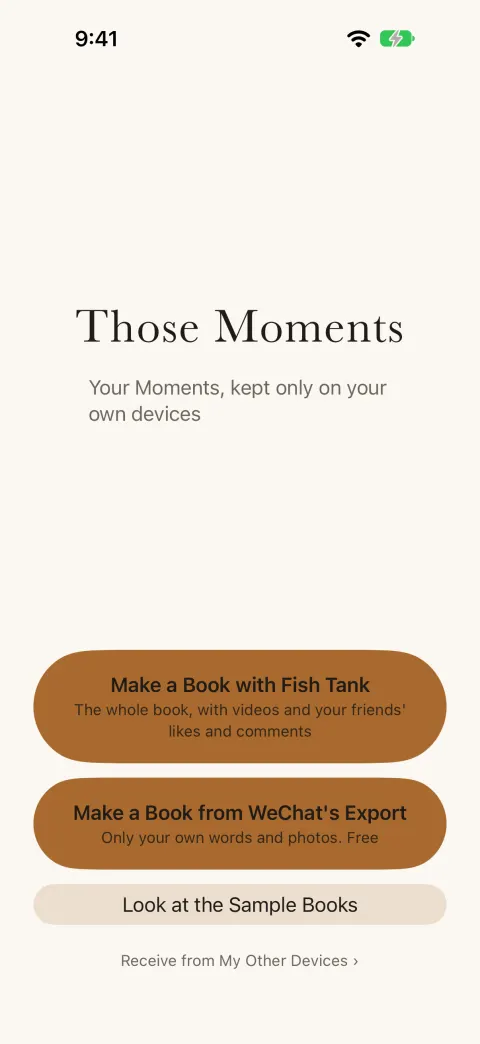
2Tap “Import Helper”
In the app, tap “Import Helper” and read the note first: when the Import Helper logs in to your WeChat, it goes through your own network, by way of this phone or a computer on the same network. WeChat may still ask you to verify yourself, as on any new device, so please don't use a newly registered WeChat account or one that has been restricted before. It goes on by itself after 15 seconds. Keep the phone on Wi‑Fi.
3Scan the login code with WeChat
The phone shows WeChat's login code. Take a picture of it with another phone and scan that with this phone's WeChat; or open momentsregained.com/r in a computer's browser, enter the 8 letters the phone shows, and scan it there. Then tap “Log in” in WeChat on your phone and come straight back to the app. Do not tick “Sync recent messages” or “Auto-login on this device”.
4Let it import
Once you are logged in, the app says how much it imports: the first time is the trial, the newest 50 Moments; with a licence, up to the day the licence covers. Years of Moments can take several hours; keep the phone on Wi‑Fi and the app open. What is imported already can be opened any time.
5The book is ready
It is on your phone's Bookshelf. The Import Helper logs out of your WeChat and clears this run's data.
6For all your Moments
After the trial, buy a licence in the app. It belongs to the WeChat account you logged in with, so there is nothing to enter or save: the next time you tap “Import Helper” and log in, it imports by the licence. Later runs import only what is new.
In mainland China the Import Helper reaches WeChat through a computer on the same Wi‑Fi: install Connection Helper on that Mac and leave it open. The first time, the app asks once whether to connect through that computer.
Two kinds of pack
Those Moments reads packs. There are two kinds, with different contents and different sources.
| Base pack (free) | Enhanced pack | |
|---|---|---|
| Source | WeChat's own “Export personal information”, imported in the app | Tap “Import Helper” in the app; the Import Helper imports it and sends it straight to the phone |
| Your own text | Yes | Yes |
| Your own photos | Yes | Yes |
| Your own videos | Only noted as “a video” | Yes |
| Friends' likes and comments | No | Yes |
| Price | Free | A trial of the newest 50; all of them with a one-time licence, updates on top |
Base pack (free)
- How to get it. From WeChat's own export. In WeChat: Me › Settings › Personal Information & Permissions › Personal Information Browsing & Export › Export Personal Information; tick “Moments” and enter an email address. Within three days an email arrives with a download link and an 8-character password for the archive.
- Making the Base pack. Save the archive from the email on the phone (Files on an iPhone, Downloads on Android), on the app's Import Base Pack page choose it with “Choose .zip or .tar files…” and enter the 8-character password from the email; the app makes the Base pack itself. An archive put in the Those Moments folder is imported with “Import from this device's folder”: in the Files app on an iPhone, or in the Finder with the iPhone connected to a Mac; on Android over USB, in
Android/data/com.ThoseMoments/files/import.
Enhanced pack
- How it is made. Tap “Import Helper” in the app and scan the login code with WeChat. The Import Helper imports your Moments and sends them straight to your phone, with no files to move; once they are saved, it clears this run's data.
- The licence. The first time is a trial of the newest 50 Moments. All of them need a licence, bought in the app; it belongs to the WeChat account you log in with and is used as soon as you log in.
Questions
How long does importing take?
The first time it leafs through your whole history and downloads the original photos and videos: the more Moments, the longer, and you can leave it to it. After that each run imports only what is new, usually a quarter of an hour or so.
Do I need a computer?
No, a phone is enough. Only in mainland China does the Import Helper reach WeChat through a Mac on the same Wi‑Fi, with Connection Helper installed on it.
How does it log in to WeChat? Is it safe?
The Import Helper runs WeChat's official client on our server; you scan the code with WeChat on your phone and confirm there, as you would on any new computer, and we never touch your password. It logs in through your own network, by way of this phone or a computer on the same network, so WeChat sees your own network address. Even so, WeChat may ask you to verify yourself on a new device (your ID number, your face, a slider, or a friend's help), so please don't use a newly registered account or one restricted before. It imports only the Moments you posted, never your chats, and once they are saved it logs out and clears this run's data. WeChat's rules are WeChat's; we cannot promise anything on its behalf.
What is the licence bound to?
A licence is per WeChat account: it goes by the WeChat username, so changing your WeChat ID changes nothing. There is nothing to enter or save: once bought, it is used the next time you tap “Import Helper” and log in to that WeChat, on a new phone too.
One-time licence or updates?
A one-time licence imports all your Moments from the first up to a month after you pay, as often as you like; later posts are not included. Updates come on top: new posts, likes and comments keep flowing into the book, prepaid for a month or a year, each term following on from the point your licence already covers. A licence is just a point in time: the Moments up to it can be imported again whenever you like.
What is a referral code?
Whoever bought a one-time licence finds 3 referral codes in the book's settings in the app, each good once. A friend who enters one when buying a first one-time licence on this site pays 40% less; for each one used, the referrer gets six months of updates, following on from the licence held, used at the next run after logging in.
How do I use a licence bought on this site?
After payment you get a link. For yourself, open it on the phone that will import; for someone else, tick “This is a gift” and send them the gift card or the link. Once the app is installed and the link opened (or the card's code scanned with the phone's camera), the first time it imports and logs in to WeChat, the licence is bound to that WeChat account, with nothing to fill in. The link does not expire. If that account already holds a licence, this one is not used and can go to another account. It is refundable in full within 14 days of payment, bound or not, the fee on us; the link then stops working and the licence it gave is revoked. No refunds after that.
How do I pay?
What you buy in the app is paid to the App Store or Google Play. On this site: WeChat Pay, Alipay, PayPal or a card (Visa, Mastercard and others). Alipay and cards are paid on Stripe's page, WeChat Pay and PayPal on Paddle's; we never store card numbers. WeChat Pay needs the payment page open on a computer, scanned with WeChat on your phone.
Can I get a refund?
Yes. A one-time licence or updates bought on this site are refundable in full within 14 days of payment, no questions asked, and the licence is then revoked: use the feedback page or write to support@momentsregained.com with the order number and the email you ordered with. For what you bought in the app, ask the App Store or Google Play under their rules. The details are on the terms page.
Can someone else see my book?
No. The book is encrypted for your own phone only: copied to anyone else's device (AirDrop, a cloud drive, a USB stick) it does not open, and nothing can be seen.
New phone, or restored from a backup, and the book is gone?
Books are kept out of device backups. On the new phone, tap “Import Helper” once more and log in to the same WeChat; your licence is used by itself.
Connection Helper on the computer needs updating?
Download the new version from the download page. In mainland China it only helps the Import Helper reach WeChat; it imports no Moments on the computer.
How do I check the Connection Helper download?
The installer is signed with an Apple Developer ID and notarised by Apple, so there is usually no need. To check it, run shasum -a 256 ~/Downloads/ConnectionHelper-*.dmg in Terminal and compare it with the SHA-256 on the download page.
Which devices? What is the large-screen edition?
The app runs on iPhone, iPad and Vision Pro, and Android phones and tablets buy it once on Google Play. The large-screen edition is an in-app purchase that unlocks reading on the iPad and Vision Pro; the sample books show the large screens for free.
Where is my licence?
It stays on this site; there is nothing to save. After you use the Import Helper and log in, the book's settings in the app show the day your licence covers up to. For what you bought on this site, the order page shows the order, given the order number and the email you ordered with.
No answer here? Write to us.
Write to us
Refunds, after-sales, technical questions and suggestions all go through the feedback page: a form that takes screenshots, and the email address. We usually reply within two working days.